> For the complete documentation index, see [llms.txt](https://eni-3.gitbook.io/eni-docs/llms.txt). Markdown versions of documentation pages are available by appending `.md` to page URLs; this page is available as [Markdown](https://eni-3.gitbook.io/eni-docs/tutorial-center/essential-guides/bridgers-swap-gas-swap-cross-chain-bridge-tutorial.md).

# Bridgers Swap · Gas Swap · Cross-chain Bridge Tutorial

The ENI bridge system now officially integrates Bridgers, enabling one-click seamless swaps across 50+ chains and 600+ tokens.

<mark style="background-color:green;">**Bridgers currently supports:**</mark>

🔹 EGAS/USDT — Multi-chain USDT instant swap

🔹 Multi-chain GAS token direct exchange

🔹 Multi-chain USDT cross-chain swaps

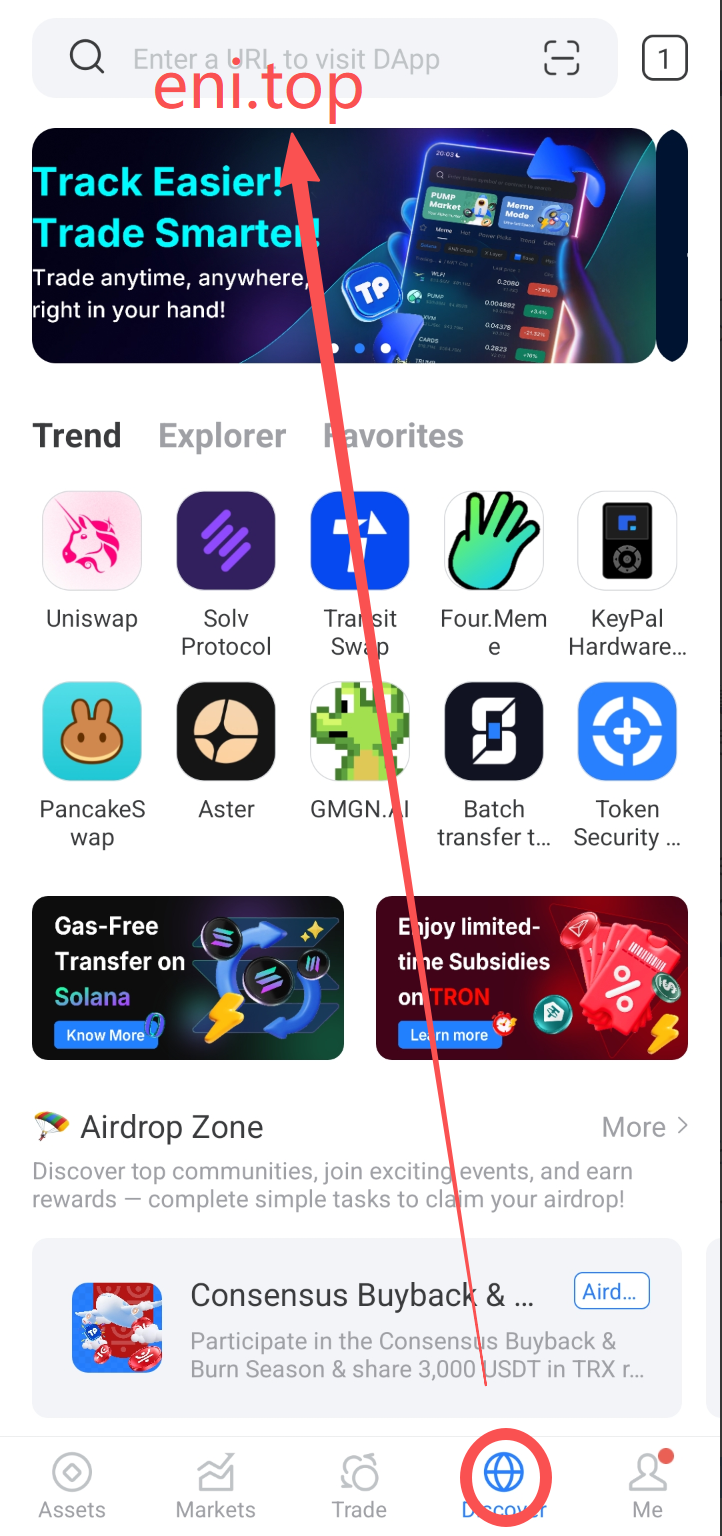
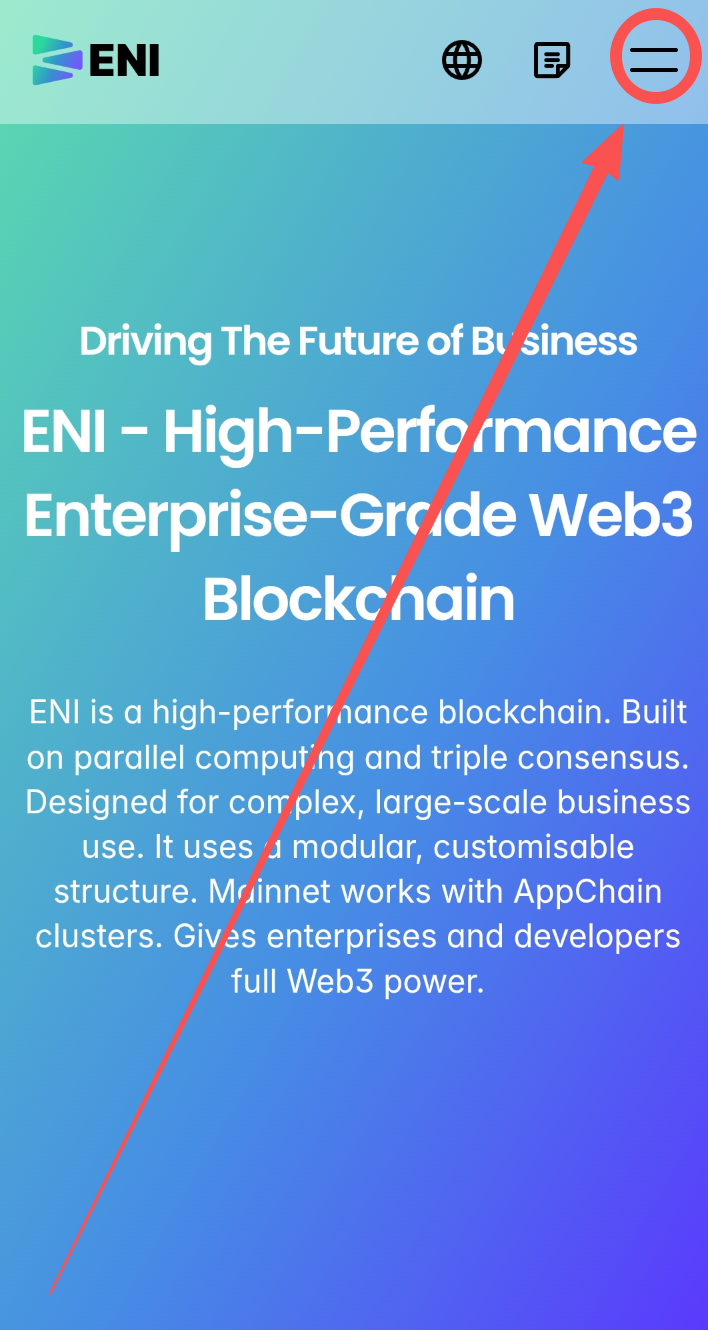
<mark style="background-color:green;">**Step 1:**</mark> <mark style="background-color:green;"></mark><mark style="background-color:green;">Enter</mark> <mark style="background-color:green;"></mark><mark style="background-color:green;">**“eni.top”**</mark> <mark style="background-color:green;"></mark><mark style="background-color:green;">in the wallet discovery page to access the official ENI website</mark>

<figure><img src="https://3841499364-files.gitbook.io/~/files/v0/b/gitbook-x-prod.appspot.com/o/spaces%2Fj70fGKUiEwtlQk5ymjpX%2Fuploads%2FpvG2cJpyWPkDfnLrFvdA%2Fimage.png?alt=media&amp;token=d7a67b39-1f71-4125-8677-68b9ddff4b6d" alt=""><figcaption></figcaption></figure>

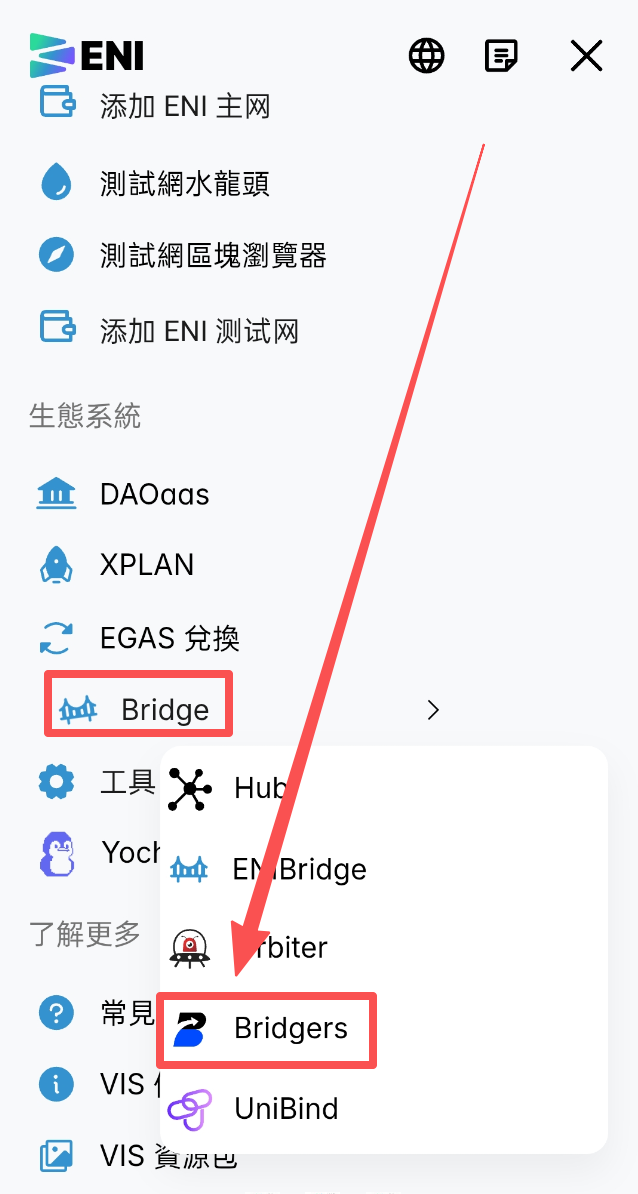
<mark style="background-color:green;">**Step 2:**</mark> <mark style="background-color:green;"></mark><mark style="background-color:green;">In the top right menu, select</mark> <mark style="background-color:green;"></mark><mark style="background-color:green;">**“Ecosystem”**</mark><mark style="background-color:green;">, and click</mark> <mark style="background-color:green;"></mark><mark style="background-color:green;">**“Bridgers”**</mark> <mark style="background-color:green;"></mark><mark style="background-color:green;">under the</mark> <mark style="background-color:green;"></mark><mark style="background-color:green;">**“Bridge”**</mark> <mark style="background-color:green;"></mark><mark style="background-color:green;">option</mark>

<div><figure><img src="https://3841499364-files.gitbook.io/~/files/v0/b/gitbook-x-prod.appspot.com/o/spaces%2Fj70fGKUiEwtlQk5ymjpX%2Fuploads%2FV9J2sUADlkWt0GIw3Hpb%2Fimage.png?alt=media&amp;token=b4c0118f-104e-401f-bd75-97d9c44ba979" alt=""><figcaption></figcaption></figure> <figure><img src="https://3841499364-files.gitbook.io/~/files/v0/b/gitbook-x-prod.appspot.com/o/spaces%2Fj70fGKUiEwtlQk5ymjpX%2Fuploads%2FjrWyYJKdG5l7PnFFEaAc%2Fimage.png?alt=media&amp;token=ad606a55-3b6d-46c0-985c-6efb917ee966" alt=""><figcaption></figcaption></figure></div>

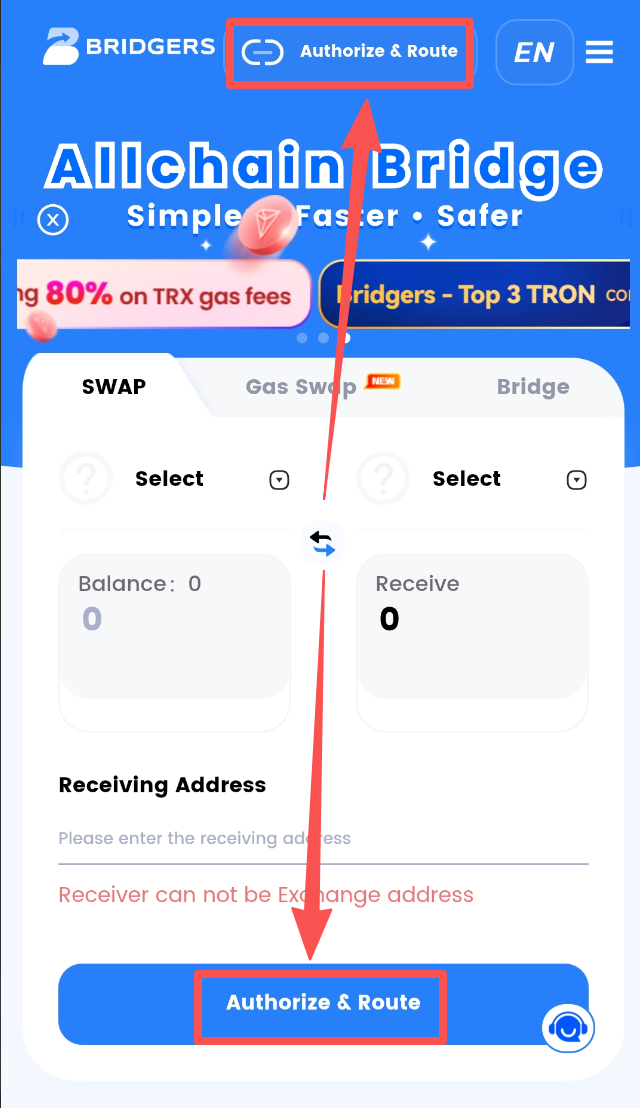
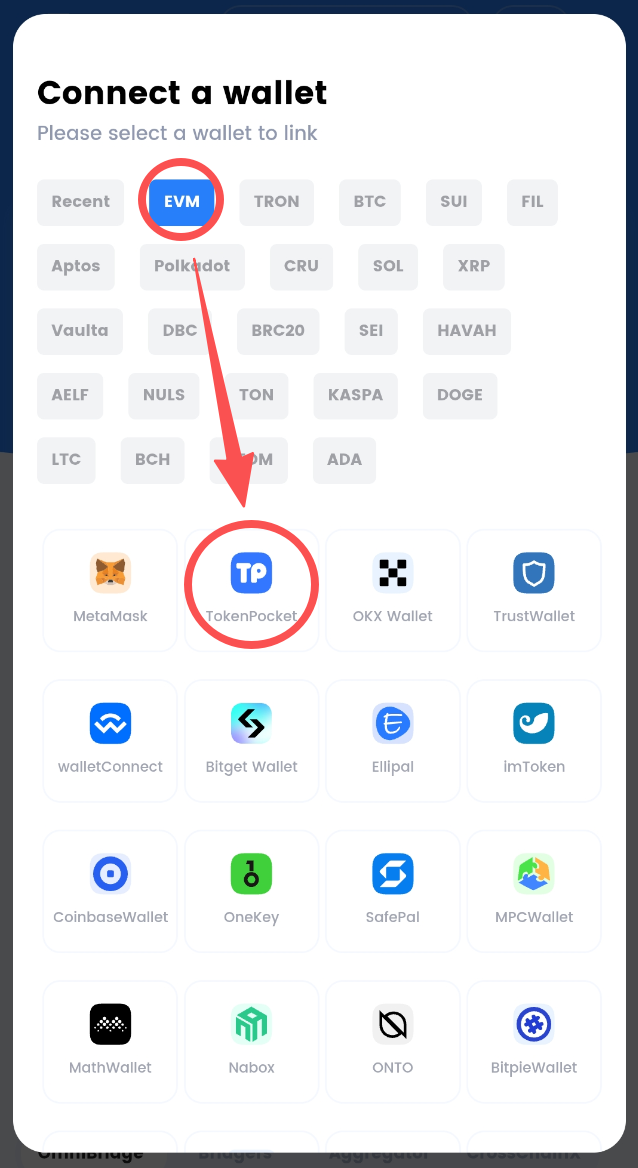
<mark style="background-color:green;">**Step 3:**</mark> <mark style="background-color:green;"></mark><mark style="background-color:green;">Click</mark> <mark style="background-color:green;"></mark><mark style="background-color:green;">**“Authorize & Route”**</mark><mark style="background-color:green;">, then select</mark> <mark style="background-color:green;"></mark><mark style="background-color:green;">**“EVM”**</mark> <mark style="background-color:green;"></mark><mark style="background-color:green;">and</mark> <mark style="background-color:green;"></mark><mark style="background-color:green;">**“TokenPocket”**</mark> <mark style="background-color:green;"></mark><mark style="background-color:green;">in order.</mark>

<div><figure><img src="https://3841499364-files.gitbook.io/~/files/v0/b/gitbook-x-prod.appspot.com/o/spaces%2Fj70fGKUiEwtlQk5ymjpX%2Fuploads%2FxhaRsNtXXmqxq8nVM4Qn%2Fimage.png?alt=media&amp;token=1dcc96ab-a687-407c-b589-b6b51cea2341" alt=""><figcaption></figcaption></figure> <figure><img src="https://3841499364-files.gitbook.io/~/files/v0/b/gitbook-x-prod.appspot.com/o/spaces%2Fj70fGKUiEwtlQk5ymjpX%2Fuploads%2FTpt6AErfRrql9NOGV287%2Fimage.png?alt=media&amp;token=5675bca3-143a-4971-9f4e-f2be408dd7cf" alt=""><figcaption></figcaption></figure></div>

#### <mark style="background-color:green;">**✅Swap**</mark>&#xD;

Supports ENI EGAS/USDT - Multi-chain USDT Instant Swap

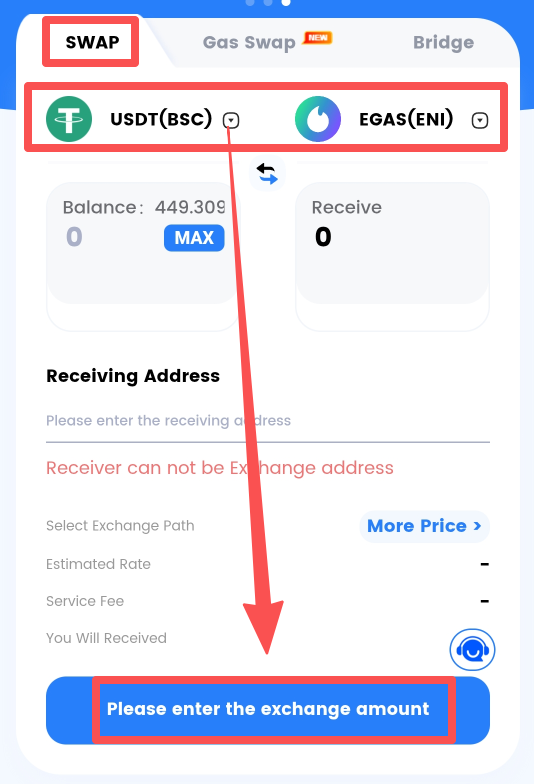
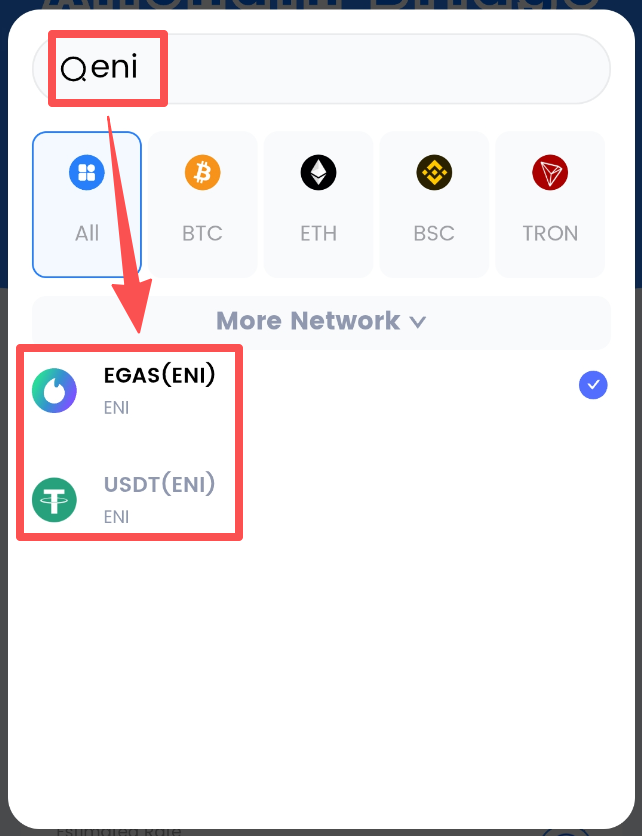
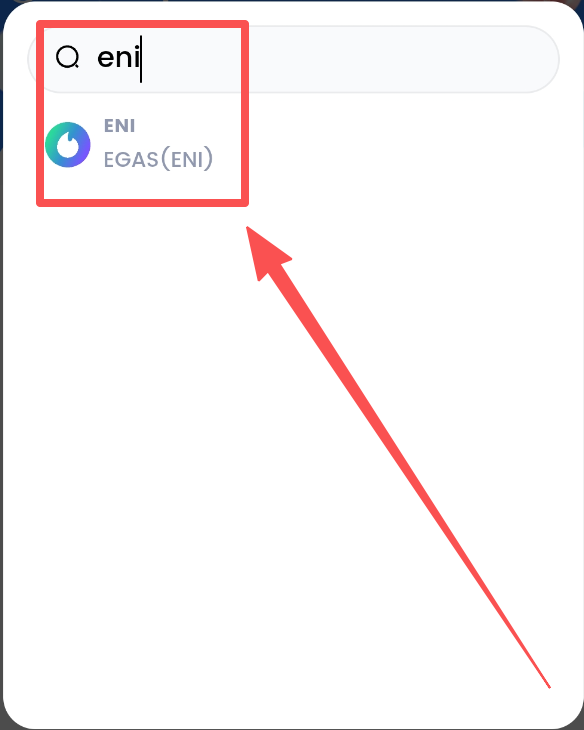
Select **"SWAP"**, click the token field to choose a token, and type **"eni"** in the search bar to select the ENI token

<div><figure><img src="https://3841499364-files.gitbook.io/~/files/v0/b/gitbook-x-prod.appspot.com/o/spaces%2Fj70fGKUiEwtlQk5ymjpX%2Fuploads%2Fp1WEZ8wKVHflJtq2Q3mY%2Fimage.png?alt=media&amp;token=08ef552a-f25d-4629-ac51-adc43ad434bb" alt=""><figcaption></figcaption></figure> <figure><img src="https://3841499364-files.gitbook.io/~/files/v0/b/gitbook-x-prod.appspot.com/o/spaces%2Fj70fGKUiEwtlQk5ymjpX%2Fuploads%2FX9O6AYkAYqm42eh4qx61%2Fimage.png?alt=media&amp;token=74702484-ab3e-40bb-91e6-454af7aff44b" alt=""><figcaption></figcaption></figure></div>

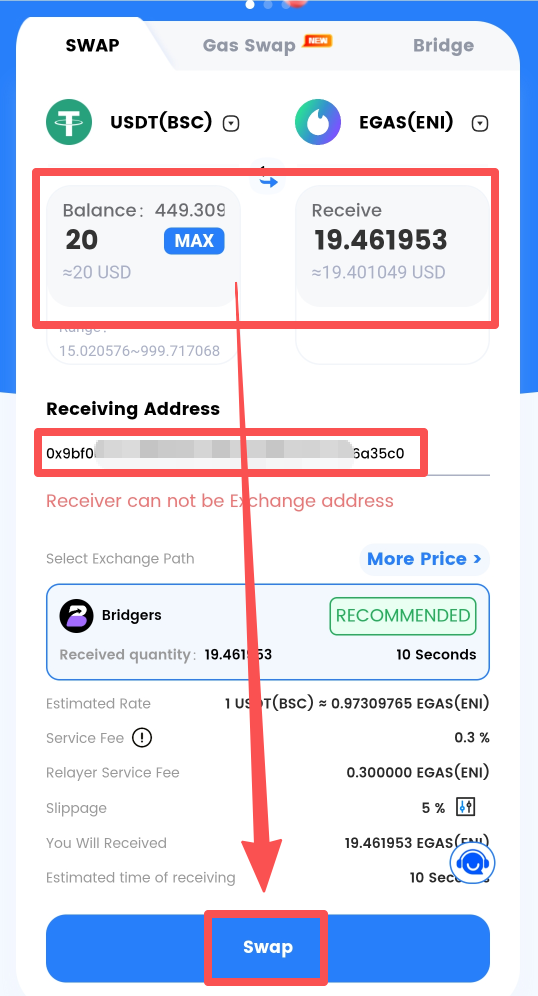
After entering the amount, input the receiving address and click **“One-Click Cross-Chain Swap”** after confirming all details are correct.

<mark style="background-color:yellow;">**⚠Note:**</mark> <mark style="background-color:yellow;"></mark><mark style="background-color:yellow;">Do NOT use exchange or other centralized addresses as the receiving address, otherwise cross-chain assets may be lost.</mark>

<figure><img src="https://3841499364-files.gitbook.io/~/files/v0/b/gitbook-x-prod.appspot.com/o/spaces%2Fj70fGKUiEwtlQk5ymjpX%2Fuploads%2F2n7UAne1WLpOPR4sWcEk%2Fimage.png?alt=media&amp;token=cd869d6b-a624-48ce-a0fe-5a246f29c469" alt=""><figcaption></figcaption></figure>

#### <mark style="background-color:green;">**✅Gas Swap**</mark>&#xD;

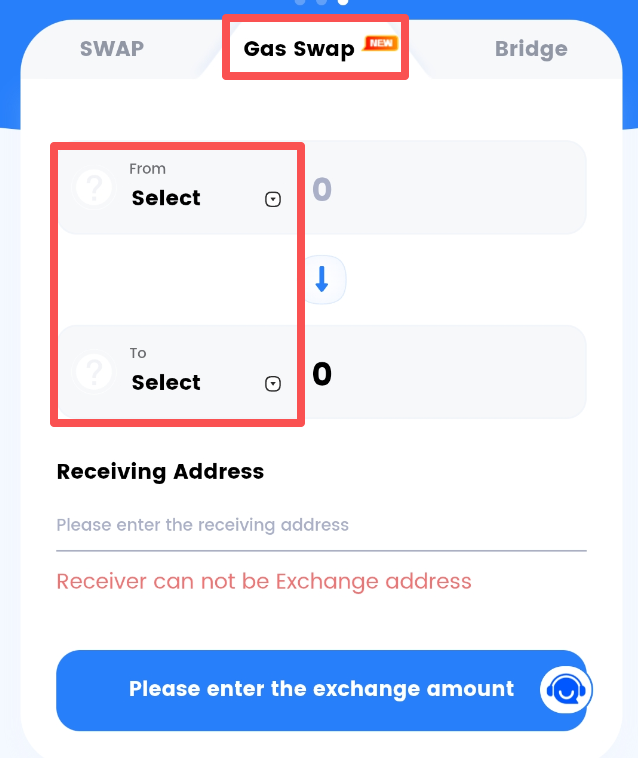
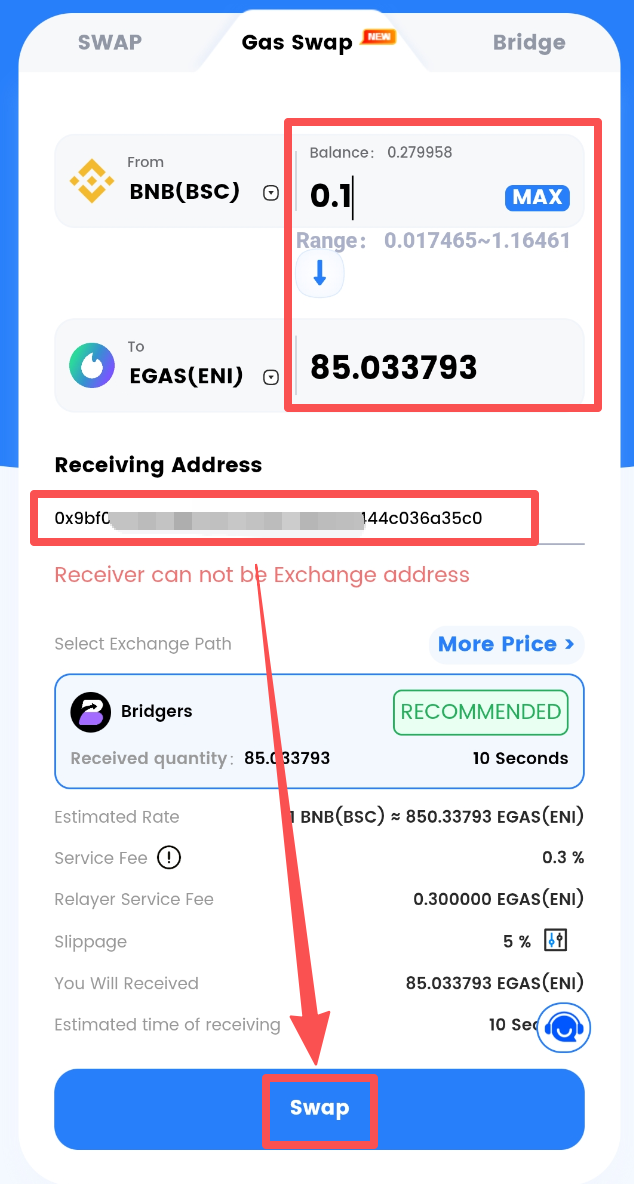
Gas Swap supports direct exchange of multi-chain gas tokens, such as swapping BNB directly for EGAS.

Select the **"Gas Swap"** section, click the token field to choose a GAS token, and type **"eni"** in the search bar to select EGAS.

<div><figure><img src="https://3841499364-files.gitbook.io/~/files/v0/b/gitbook-x-prod.appspot.com/o/spaces%2Fj70fGKUiEwtlQk5ymjpX%2Fuploads%2F6m04qc7L1oeGXPYv88qi%2Fimage.png?alt=media&amp;token=8fca7b1a-590f-46b1-9467-50faf0b3f7de" alt=""><figcaption></figcaption></figure> <figure><img src="https://3841499364-files.gitbook.io/~/files/v0/b/gitbook-x-prod.appspot.com/o/spaces%2Fj70fGKUiEwtlQk5ymjpX%2Fuploads%2FBx7C7Go7ZaYlOjVxaR1v%2Fimage.png?alt=media&amp;token=294411d2-b338-43cc-ade4-92f32c7820b4" alt=""><figcaption></figcaption></figure></div>

After entering the amount and receiving address, click **"One-click Cross-chain Swap."**

<mark style="background-color:yellow;">**⚠Note:**</mark> <mark style="background-color:yellow;"></mark><mark style="background-color:yellow;">Do not enter an exchange or other centralized address as the receiving address, as it may result in cross-chain asset loss.</mark>

<figure><img src="https://3841499364-files.gitbook.io/~/files/v0/b/gitbook-x-prod.appspot.com/o/spaces%2Fj70fGKUiEwtlQk5ymjpX%2Fuploads%2F6S04dK4HGitASsMMHRNc%2Fimage.png?alt=media&amp;token=0268cef3-15d7-493d-b5ad-a3f7b851f0ee" alt=""><figcaption></figcaption></figure>

#### <mark style="background-color:green;">**✅Cross-chain Bridge**</mark>&#xD;

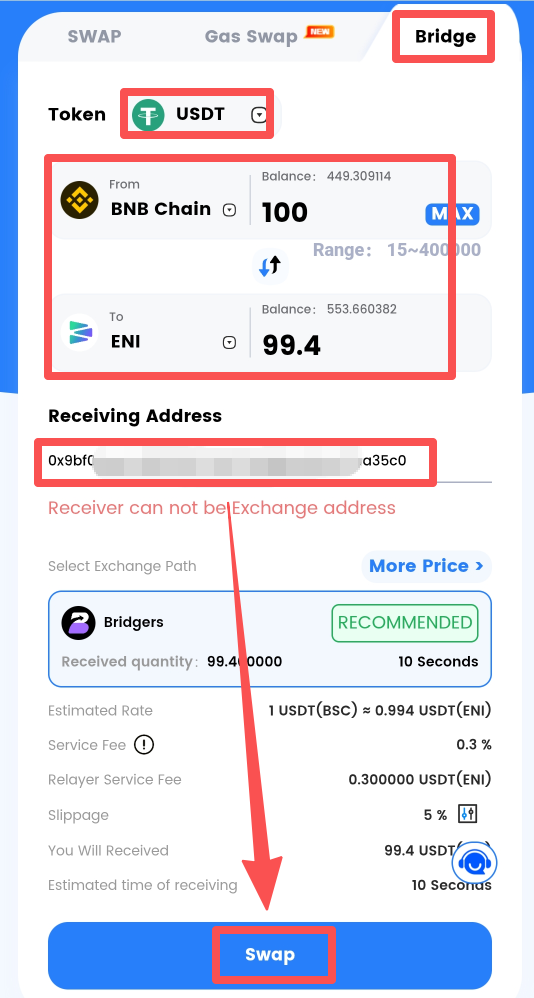
The Bridgers cross-chain bridge supports multi-chain USDT cross-chain swaps.

Select the **“Cross-chain Bridge”** tab, choose USDT in the token field, select the target network, enter the amount and receiving address, then click **“One-click Cross-chain Swap.”**

<mark style="background-color:yellow;">**⚠Note:**</mark> <mark style="background-color:yellow;"></mark><mark style="background-color:yellow;">Do not use exchange or other centralized addresses as the receiving address, or cross-chain assets may be lost.</mark>

<figure><img src="https://3841499364-files.gitbook.io/~/files/v0/b/gitbook-x-prod.appspot.com/o/spaces%2Fj70fGKUiEwtlQk5ymjpX%2Fuploads%2FdeqTXhOni7m3wRruzHEs%2Fimage.png?alt=media&amp;token=b22b018a-81ba-4820-90c5-92292995cf09" alt=""><figcaption></figcaption></figure>