> For the complete documentation index, see [llms.txt](https://eni-3.gitbook.io/eni-docs/llms.txt). Markdown versions of documentation pages are available by appending `.md` to page URLs; this page is available as [Markdown](https://eni-3.gitbook.io/eni-docs/tutorial-center/tutorial-how-to-use-eni-on-bitget-wallet.md).

# Tutorial: How to use ENI on Bitget Wallet?

**ENI has completed deep integration with Bitget Wallet, enabling full-feature access, including:**

* <mark style="background-color:green;">One-click add ENI network and token</mark>
* <mark style="background-color:green;">On-chain listings of ENI tokens</mark>
* <mark style="background-color:green;">Real-time token price display</mark>
* <mark style="background-color:green;">One-click instant-swap / cross-chain access</mark>
* <mark style="background-color:green;">Integrated trade history</mark>

{% content-ref url="/pages/lQOHUskjmWr9GQTM4kPn" %}
[Bitget Wallet Quick Start Guide](/eni-docs/tutorial-center/tutorial-how-to-use-eni-on-bitget-wallet/bitget-wallet-quick-start-guide.md)
{% endcontent-ref %}

This tutorial shows how to use ENI on Bitget easily.

#### <mark style="background-color:green;">1️⃣\[Quick: Add ENI Network & Tokens]</mark>&#xD;

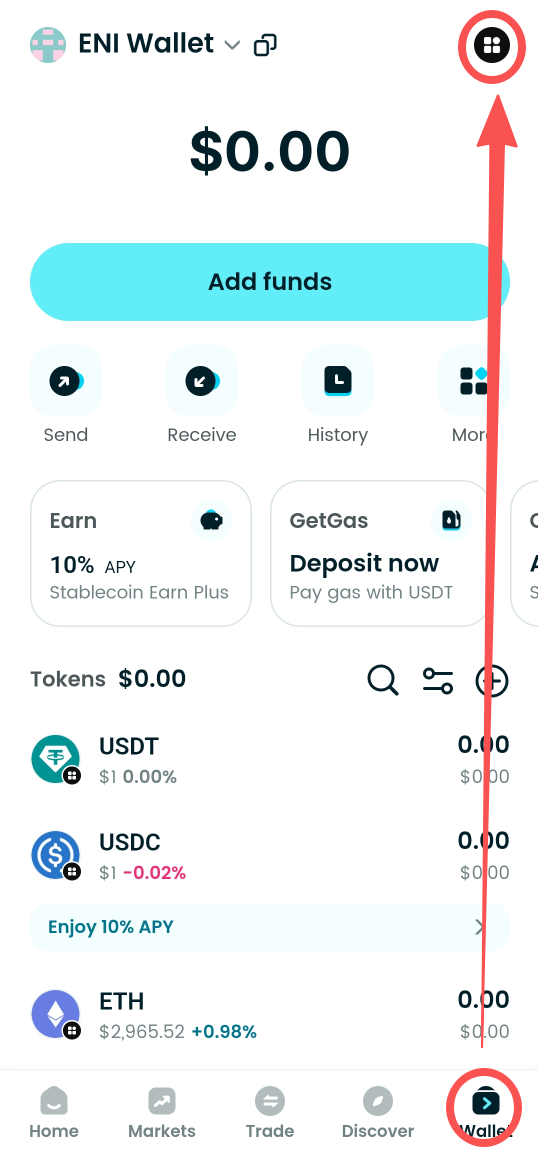
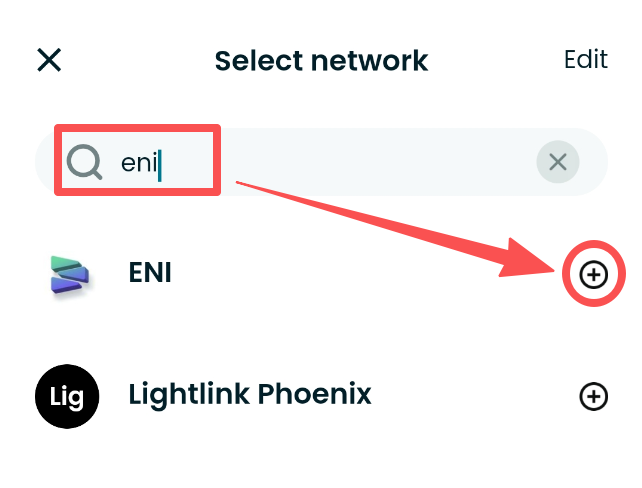
On the Wallet page, open the network list at the top-right, type **“eni”** in the search box, then click the **“+”** to add the ENI Mainnet.

<figure><img src="https://3841499364-files.gitbook.io/~/files/v0/b/gitbook-x-prod.appspot.com/o/spaces%2Fj70fGKUiEwtlQk5ymjpX%2Fuploads%2FdzCPjNbd4qACoLaNQ6Fq%2Fimage.png?alt=media&amp;token=8facf74b-6fa1-4d03-8ebe-a18c229f702c" alt=""><figcaption></figcaption></figure>

<figure><img src="https://3841499364-files.gitbook.io/~/files/v0/b/gitbook-x-prod.appspot.com/o/spaces%2Fj70fGKUiEwtlQk5ymjpX%2Fuploads%2FIFDz4q0tkjfkpc1b18bP%2Fimage.png?alt=media&amp;token=fe76241d-67b4-4b22-b970-a2b7521853f0" alt=""><figcaption></figcaption></figure>

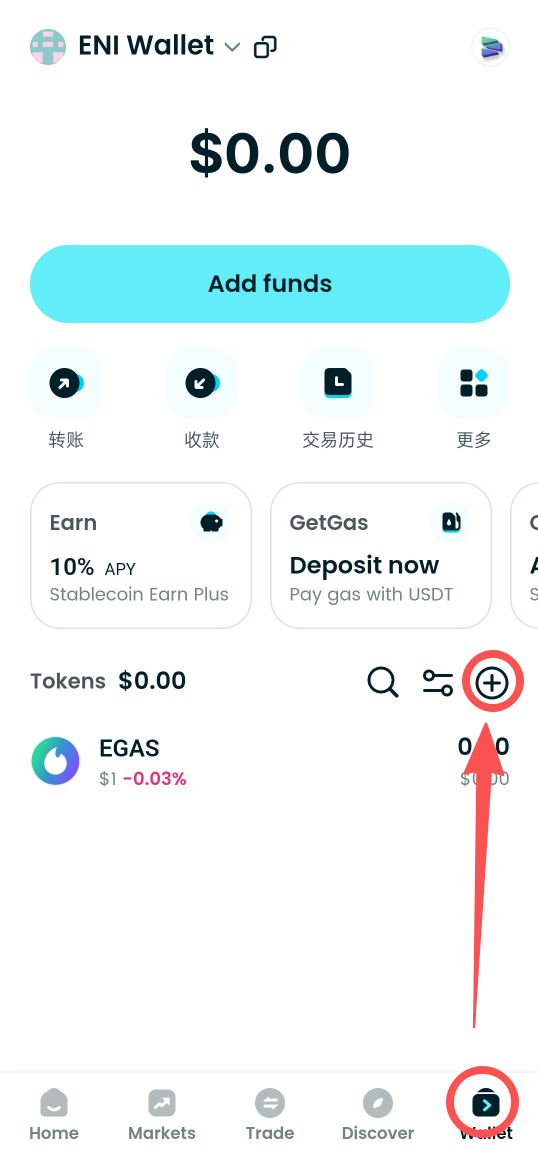
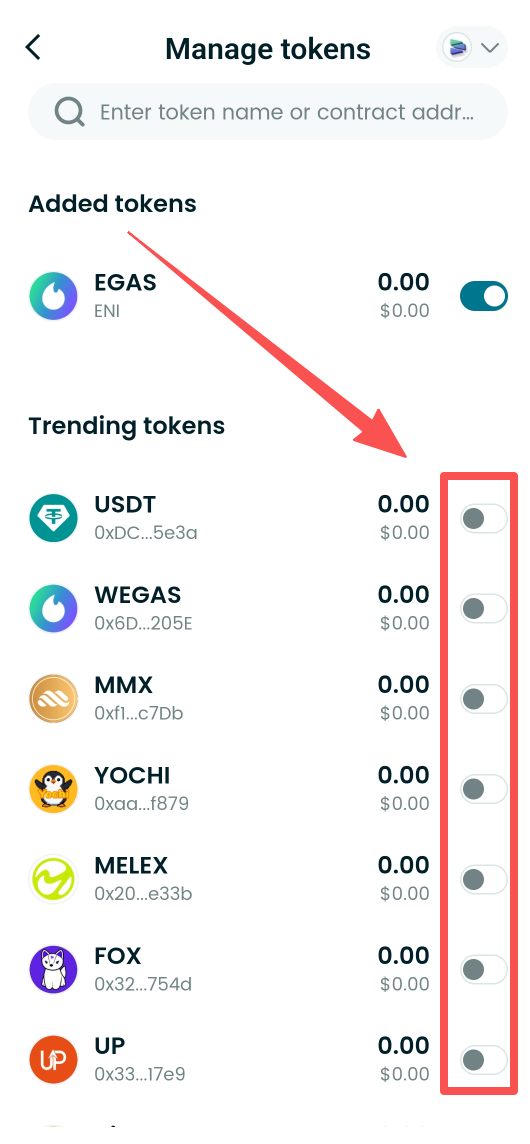
Click the **“+”** on the right side of the tokens section and check the tokens you want to add. Once added, you can view token balances and real-time price info.

<div><figure><img src="https://3841499364-files.gitbook.io/~/files/v0/b/gitbook-x-prod.appspot.com/o/spaces%2Fj70fGKUiEwtlQk5ymjpX%2Fuploads%2FPxtKYnhab8rko4S0G6fc%2Fimage.png?alt=media&amp;token=3fc95cba-cbcc-4c7f-8b8a-36cb638d775a" alt=""><figcaption></figcaption></figure> <figure><img src="https://3841499364-files.gitbook.io/~/files/v0/b/gitbook-x-prod.appspot.com/o/spaces%2Fj70fGKUiEwtlQk5ymjpX%2Fuploads%2FSJBbSwjJdbFgie4CGgz1%2Fimage.png?alt=media&amp;token=b09f9b64-a6ae-47f3-b149-3ea6e576226f" alt=""><figcaption></figcaption></figure></div>

#### <mark style="background-color:green;">2️⃣\[View Market & Price Chart]</mark>&#xD;

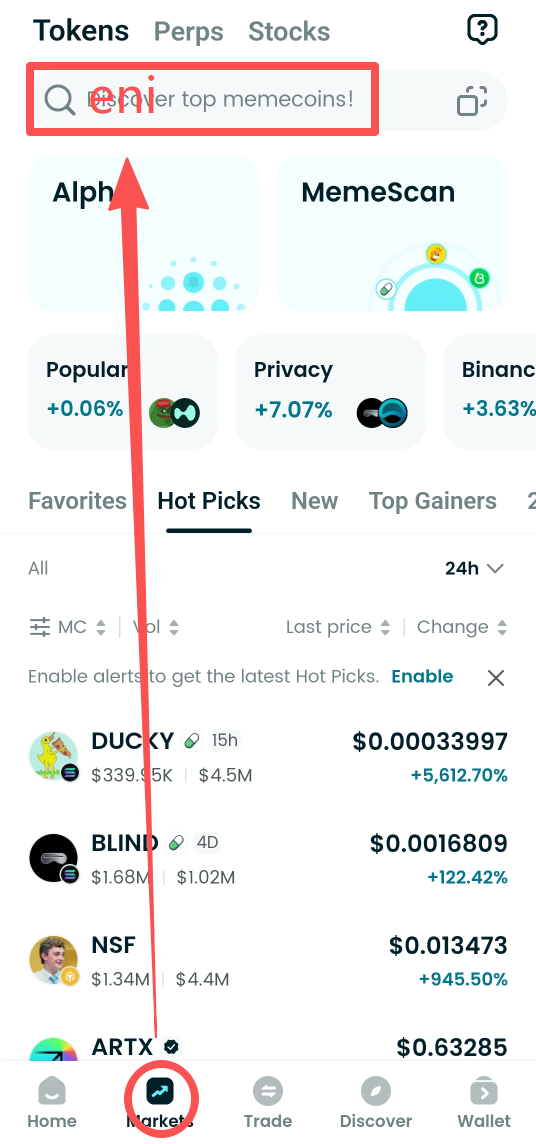
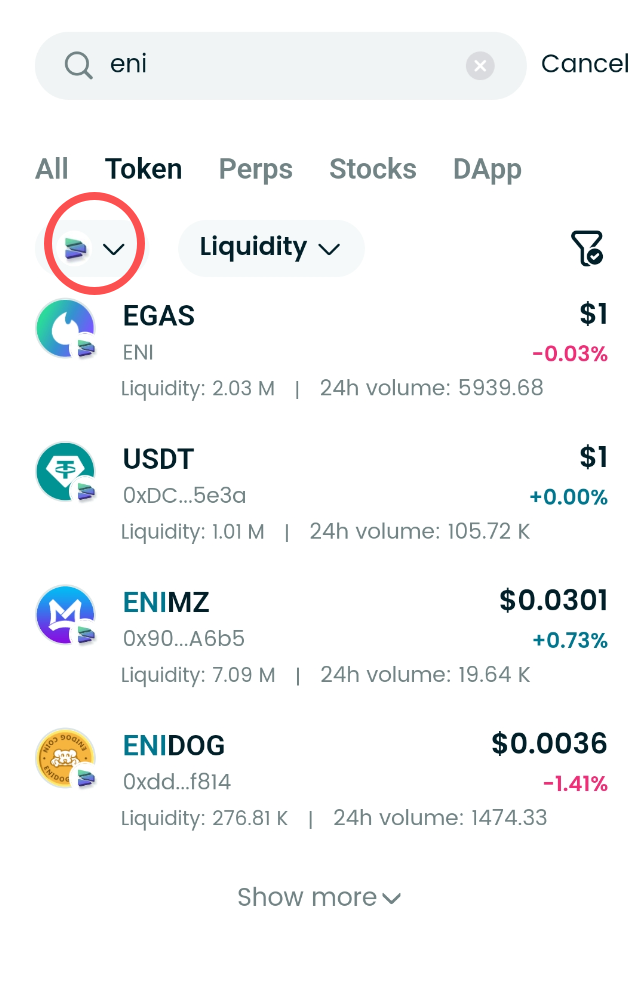
On the **"Market"** page, enter **"eni"** in the search bar and select ENI from the network list to view on-chain token market data and the price chart.

<div><figure><img src="https://3841499364-files.gitbook.io/~/files/v0/b/gitbook-x-prod.appspot.com/o/spaces%2Fj70fGKUiEwtlQk5ymjpX%2Fuploads%2FTssiy4f5k37HZs93549q%2Fimage.png?alt=media&amp;token=87bfa91a-711f-4be0-824e-4490e5932821" alt=""><figcaption></figcaption></figure> <figure><img src="https://3841499364-files.gitbook.io/~/files/v0/b/gitbook-x-prod.appspot.com/o/spaces%2Fj70fGKUiEwtlQk5ymjpX%2Fuploads%2FjFG8qL1qXBAcxJdi5WlX%2Fimage.png?alt=media&amp;token=7bb0c88b-46ea-4ba7-8162-66ce123d8102" alt=""><figcaption></figcaption></figure></div>

#### <mark style="background-color:green;">3️⃣\[Instant Swap & Cross-chain]</mark>&#xD;

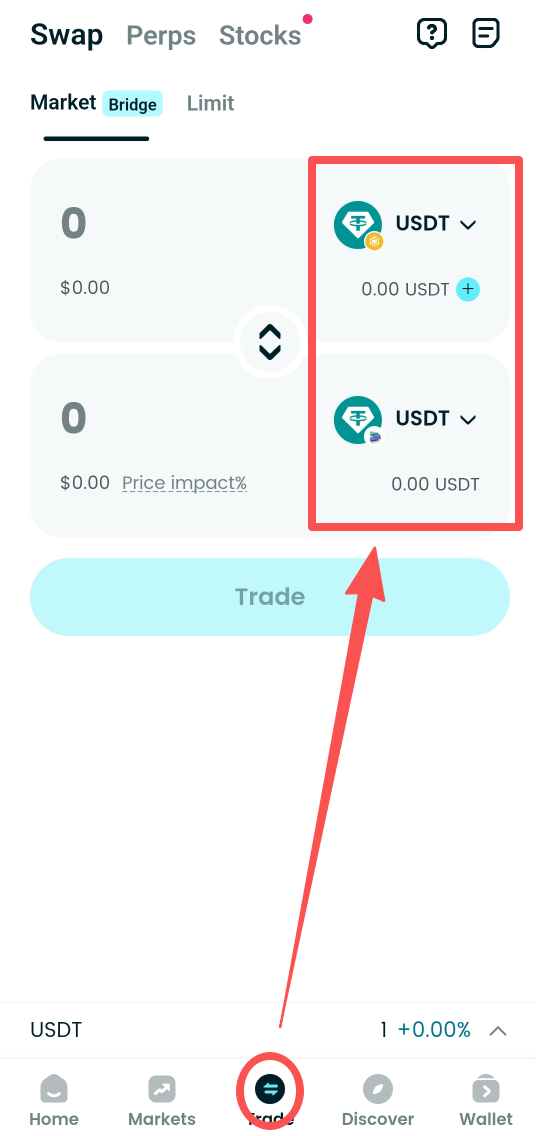
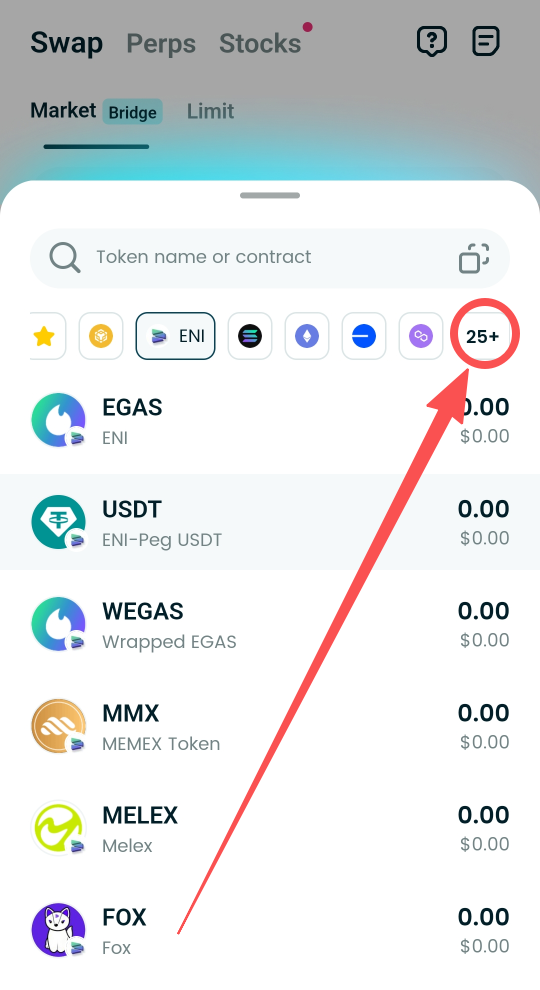
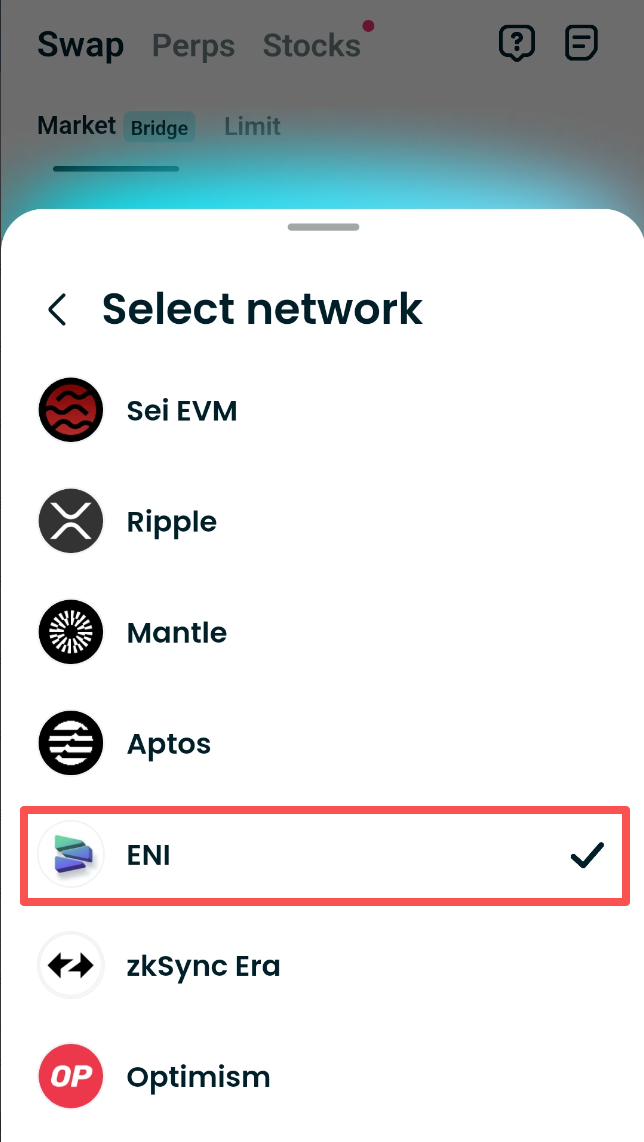
On the Trade page, select the network and token in the token field to perform instant cross-chain asset swaps.
<div><figure><img src="https://3841499364-files.gitbook.io/~/files/v0/b/gitbook-x-prod.appspot.com/o/spaces%2Fj70fGKUiEwtlQk5ymjpX%2Fuploads%2Fdv0zMyvyU5AJJkJtU6J6%2Fimage.png?alt=media&amp;token=5900e61d-dbcf-4ffb-a61e-381d28280ae9" alt=""><figcaption></figcaption></figure> <figure><img src="https://3841499364-files.gitbook.io/~/files/v0/b/gitbook-x-prod.appspot.com/o/spaces%2Fj70fGKUiEwtlQk5ymjpX%2Fuploads%2F2GMeOSftw9FOj3fCO8Rb%2Fimage.png?alt=media&amp;token=027479ae-1ff0-4d3c-a222-181cc10d78ab" alt=""><figcaption></figcaption></figure> <figure><img src="https://3841499364-files.gitbook.io/~/files/v0/b/gitbook-x-prod.appspot.com/o/spaces%2Fj70fGKUiEwtlQk5ymjpX%2Fuploads%2FwlNFQBsUABtQwj1sCnW3%2Fimage.png?alt=media&amp;token=0ae6480c-6ba0-4a96-9a03-de3013884e77" alt=""><figcaption></figcaption></figure></div>